Getting started
Installation
Not on PyPI yet?
At this early stage the package may not be published on PyPI yet. In the meantime you can install it from source:
Your first scenario
Import the library and write your test cases with the Given/When/Then keywords, each taking a single
natural-language step:
*** Settings ***
Library    robotframework_lynqa.LynqaLibrary    api_key=%{LYNQA_API_KEY}

*** Variables ***
${LYNQA_URL}    https://lemonde.fr

*** Test Cases ***
Search An Article
    Given    the website is open
    When     I search an article on "france ia"
    Then     there is an article on "IA agentique"
The scenario is captured and submitted to Lynqa, which runs it against the site at ${LYNQA_URL} and reports
each step's result back to Robot Framework.
Reading the Robot log
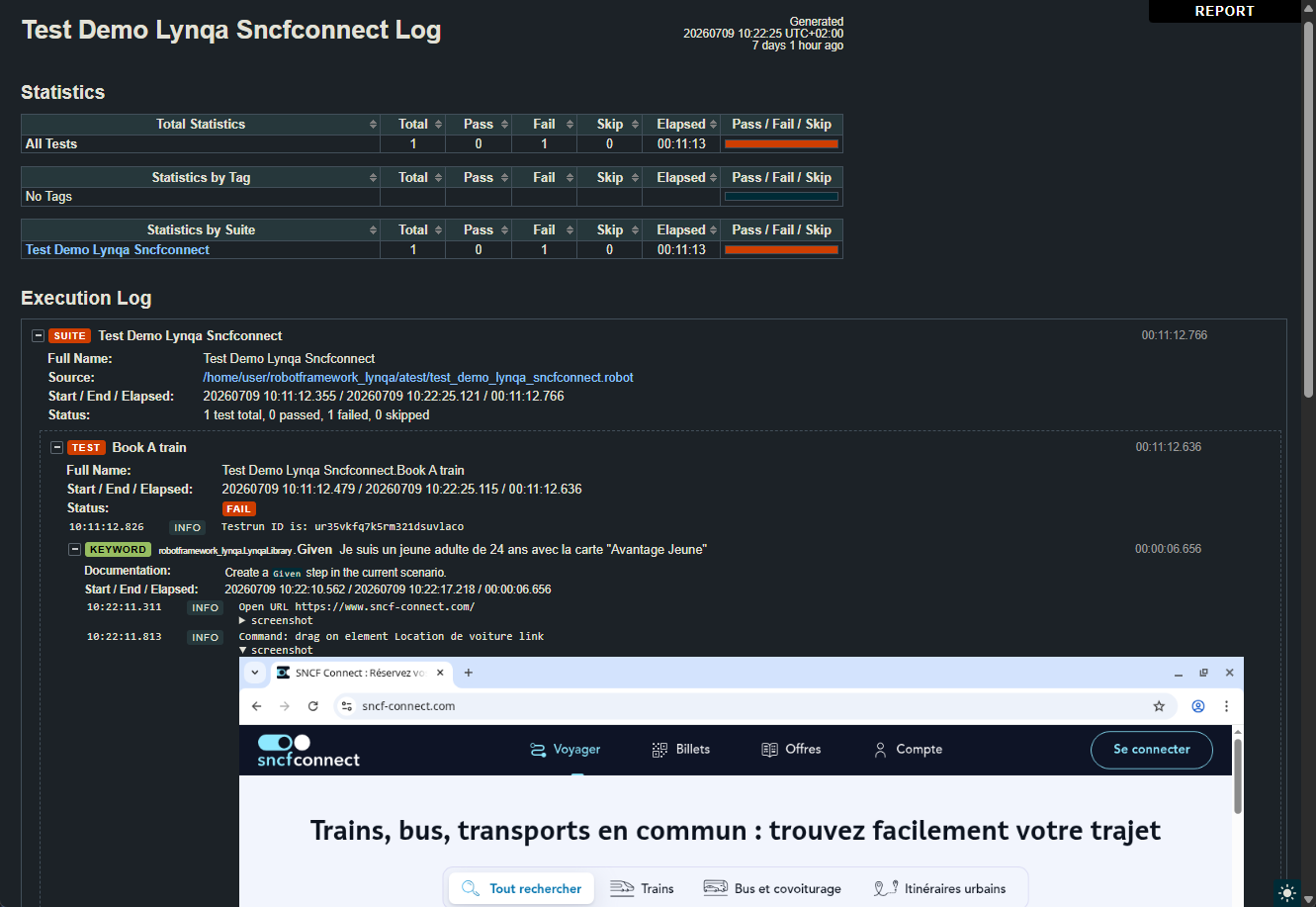
Beyond the pass/fail verdict, the library embeds Lynqa's execution evidence directly in the standard Robot
Framework log (log.html). Under each Given/When/Then keyword you get a step-by-step account of what the
agent actually did in the browser:
- Commands done by the agent: every low-level action Lynqa performed to carry out the step. A command that failed is
logged at
ERRORlevel so it stands out in red. - Assertion results: each check is logged as an
Assertion: "..."line, atINFOlevel when the assertion holds and atERRORlevel when it fails. When a step fails, the reason reported by Lynqa is logged as aVerdict:line. - Screenshots: the page state is captured as an inline screenshot at each stage. Screenshots are
embedded in a collapsible
screenshotblock, so you can expand only the ones you care about.
Configuration variables
| Variable | Required | Description |
|---|---|---|
${LYNQA_URL} |
Yes | URL of the web application under test. |
${LYNQA_LOCALE} |
No | Browser locale of the user running the scenario, e.g. fr_FR. |
${LYNQA_DATETIME} |
No | Date and time of the run (defaults to the current local date and time). |
&{LYNQA_SECRETS} |
No | Mapping of secret name to value (e.g. login=superu password=TrèsS3cr3t). |
Providing your API key
The library authenticates with the api_key argument. Keep the key out of your test data by reading it from an
environment variable with Robot Framework's %{ENV_VAR} syntax, as shown above:
Create a key from the Lynqa integration page.
Execution timeout
A Lynqa run is asynchronous: once a scenario is submitted, the library polls Lynqa until the run reaches a final status. By default it waits up to 1 hour before failing the test with a timeout error.
To change this behaviour, use Robot Framework's
timeout feature,
the Test Timeout setting in *** Settings ***, or a [Timeout] on an individual test case, which caps how
long a test, including this wait, is allowed to run:
*** Settings ***
Library         robotframework_lynqa.LynqaLibrary    api_key=%{LYNQA_API_KEY}
Test Timeout    30 minutes
Next steps
Head to the Keyword reference for the full details of the Given/When/Then keywords and how
they drive Lynqa.